

Anycast, BGP, Carrier Direct Connect… What Do These Have to Do with Website Speed?
Many have heard of Anycast, BGP, and carrier direct connect, but don’t really understand what problems they solve. Today, CDN07 explains in plain language how these concepts actually relate to your website's loading speed.

When people talk about website speed, they often throw around terms like: Anycast, BGP, carrier direct connect.
It sounds advanced, but when your own site is slow, laggy, or dropping packets, you’re left wondering what these terms have to do with “slow loading.”
Having worked in networking and CDN for over a decade, I’ll be straight with you: These terms themselves don’t determine speed—what matters is *how* they’re used.
This article won’t give you textbook definitions. It answers one question: What role do they actually play in website access?
Let’s clear up the most confusing point first. Website speed boils down to three things: How far the user is from you, how many detours the data takes, and who interrupts it along the way.
Anycast, BGP, and carrier direct connect each tackle a different part of this puzzle.
If you think of them as “speed magic,” you’ll be disappointed.
But if you understand what each one solves, you’ll see why some sites get faster with a CDN, while others get slower.
Anycast: It doesn’t make you faster—it makes you “walk less.” There are two key things to know about Anycast:
- The IPv4 protocol doesn’t natively support Anycast.
- IPv6 natively supports Anycast, but IPv6 still isn’t fully widespread or perfected.
So far, the biggest challenge in implementing Anycast is making it work on IPv4.
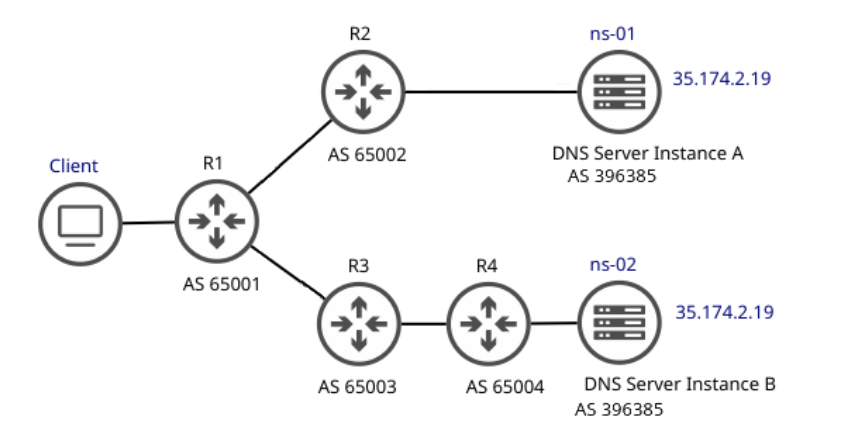
Fortunately, with the help of BGP, multiple routers in a large network can advertise the same IP route. Based on BGP, different clients are routed to different router nodes, and the routers then choose the corresponding node to transmit data—this achieves Anycast on IPv4 networks.
Anycast Advantages
- Lower Latency – Traffic entering the Anycast network is routed to the nearest node, reducing delay between the client and the node itself.
This ensures speed is optimized no matter where the client is requesting from.
- Higher Availability – Anycast improves redundancy by placing multiple servers around the globe under the same IP.
If one server fails or goes offline, traffic is rerouted to the next closest server.
- DDoS Mitigation – DDoS attacks from botnets can overwhelm a typical unicast server with massive traffic.
The benefit of an Anycast setup is that each server can “absorb” part of the attack, reducing the overall pressure on the network.
Load Balancing – Anycast can efficiently confine requests within specific network regions (usually prioritizing the node with the shortest path). It’s often paired with ECMP for effective load balancing across DNS servers.
In simple terms: One address, many “clones” in different locations.
When a user visits, they don’t pick a node—the network automatically sends them to the one that “looks closest.”Note the phrase: “Looks closest.”
It’s not necessarily the physically closest, but the one with the fewest hops and detours on the network path.
That’s why:
– Some sites get noticeably faster with Anycast
– Others see no change, or even get slower
Because Anycast only does one thing: It gets you to an entry point. What happens after that entry point isn’t its concern.
BGP: It decides which path you take, not which one you *want* to take. If Anycast is about “choosing the entrance,” then BGP is: How you actually travel from the entrance to the origin server.
BGP’s core focus isn’t speed, but something more practical: Reachability and stability.
Many think: “Multi-line BGP = automatically picks the fastest route.” That’s a common misunderstanding.
The reality: BGP chooses a path that is “available, stable, and reasonably priced,” not necessarily the “theoretically fastest.”
That’s why you’ll see:
– Even with BGP, speeds vary widely between providers
– Packet loss during peak hours often relates to BGP routing choices
BGP is the “art of compromise” in the networking world, not a performance magic trick.
Carrier Direct Connect: It doesn’t solve “fast,” it solves “less hassle.” The term “carrier direct connect” gets overused in marketing.
The plain explanation: It tries to avoid making your data switch carriers multiple times.
Every carrier switch adds more:
– Latency
– Packet loss
– Speed limits or policy interference
So-called “direct connect” is essentially: Fewer middlemen.
That’s why:
– In specific regions, direct connect makes a huge difference
– Across regions, the benefit drops off quickly
It’s not a universal solution, but for the “right region,” it’s very effective.
So what’s the real relationship between these three and website speed? Here’s a straightforward summary: Anycast decides which door you enter, BGP decides how you walk through it, and carrier direct connect decides whether you get stopped along the way.
If your site is slow, the problem usually isn’t “not using these technologies”—it’s that: They’re being used in the wrong places.
A common scenario:
– Anycast picks a node
– BGP routing takes a detour
– The data crosses three different networks in between
In this case, no amount of fancy terms will make your site fast.
Why do many people feel “my site got slower after using a CDN”? Because a CDN isn’t a speed guarantee.
What a CDN does is: Redesign your traffic path.
And path design heavily depends on:
– Region
– Network environment
– How well the provider understands the setup
That’s why truly stable sites rarely rely on a single technology term—they’re built on overall architectural choices.
Frequently Asked Questions
Q1: Is Anycast always faster than a regular node?
Not necessarily. It solves “entry point selection,” not end-to-end speed.
Q2: Why does BGP slow down during peak hours?
Because it prioritizes reachability and stability, not maximum performance.
Q3: Is more carrier direct connect always better?
No. Direct connect in the wrong region can actually increase detours.
Q4: Does an average site need to worry about this?
When your site feels “unusually slow,” it’s time to pay attention.
Q5: How can I tell which layer is causing the slowness?
Break it down: entry point, routing path, middle nodes. That’s more useful than blindly switching providers.
Share this post:
Related Posts

How to Choose a DDoS-Protected CDN for Mainland China: Speed and Security Guide
How can websites hosted overseas improve access from Mainland China without compromising DDoS protec...

What to Do When Your Website Is Slow: A Practical Guide to Troubleshooting DNS, TTFB, and Resource Loading
Why is your website slow to load? This guide walks through DNS resolution, connection setup, TTFB, i...

Why Online Card and Board Games Need an SDK-Based Game Shield for DDoS Protection
Online card and board games face persistent security risks, including DDoS attacks, HTTP floods, che...